
wp:paragraph
Your Instagram is not just a visual portfolio. Each caption that you write is a manifestation of your brand’s identity, values, and voice. You can choose your voice to be playful, formal, inspiring, or bold — it establishes your brand in any way that you want.
/wp:paragraph
wp:paragraph
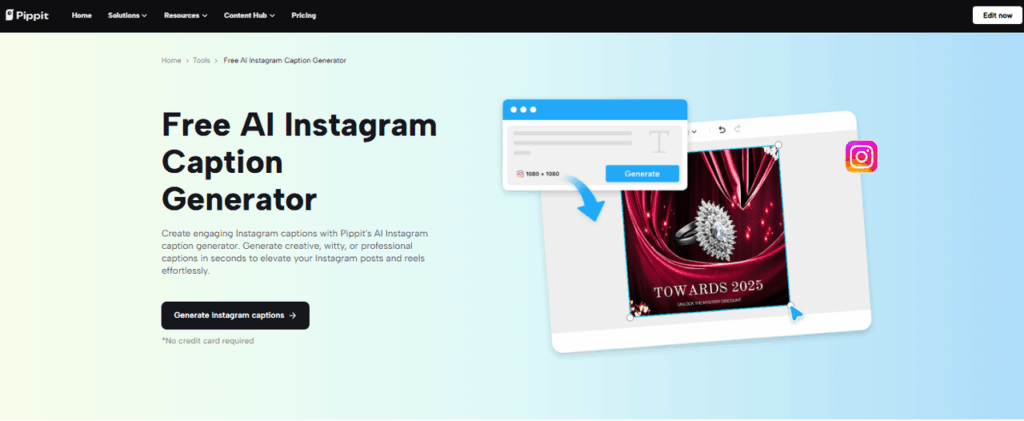
Captions are not just filler text underneath a post. They carry weight. Good captions will help you clarify your message, keep your followers engaged and reflect your brand. Actually, captions are often the missing piece between beautiful visuals and authentic communication. Pippit is essential to that. This is an AI-powered creative platform that helps to generate captions that remain true to your brand’s specific tone and style.
/wp:paragraph
wp:image {“id”:241099,”sizeSlug”:”large”,”linkDestination”:”none”}

/wp:image
wp:heading
Understanding Your Brand Voice
/wp:heading
wp:paragraph
Before you start creating better captions, you need to define what your brand voice actually is. Are you looking for a casual and witty or polished and professional tone? Your brand tone is your core values and your language needs to reflect that identity in every channel.
/wp:paragraph
wp:paragraph
Start by identifying your audience. Who are they? What language do they respond to? Do they prefer bullet points or emojis? Shaping a consistent voice will depend on having clear communication goals.
/wp:paragraph
wp:paragraph
A warm and comforting tone might suit a skincare brand if its slogan might be something along the lines of ‘self-care begins here.’ For example, a finance brand may opt for an authoritative tone and include phrases such as ‘unlock smarter investing.’ And that change in tone isn’t stylistic; it’s strategic.
/wp:paragraph
wp:heading
Tailoring Captions to Reflect Your Identity
/wp:heading
wp:paragraph
Well-written captions are powerful tools for storytelling. They let your brand personality shine while reinforcing your core message. When aligned with your visuals, captions make your content more memorable and relatable.
/wp:paragraph
wp:paragraph
Use the same vocabulary, tone, and even emoji style across all posts. If your visual style is minimalist, keep your caption short and refined. If your brand is energetic and bold, add expressive language and dynamic formatting.
/wp:paragraph
wp:paragraph
Captions for Instagram also allow creative flexibility. Use punctuation, line breaks, or all caps to highlight key messages. But consistency is key—don’t jump between styles from one post to the next.
/wp:paragraph
wp:image {“id”:241100,”sizeSlug”:”large”,”linkDestination”:”none”,”align”:”center”}
/wp:image
wp:heading
Using AI to Achieve Consistency at Scale
/wp:heading
wp:paragraph
As your content output grows, maintaining a uniform brand voice across hundreds of posts becomes difficult. That’s where automation helps. Using AI doesn’t mean sacrificing authenticity—it means enhancing it with efficiency.
/wp:paragraph
wp:paragraph
With Pippit, you can automate caption generation while keeping everything aligned with your brand’s identity. Its smart captioning tool understands tone and mood, allowing you to scale content creation without sounding generic. You can even customize templates using brand-specific words and messaging cues. This helps your content remain uniquely yours, even when automated.
/wp:paragraph
wp:heading
How to Generate Instagram Captions Using Pippit
/wp:heading
wp:paragraph
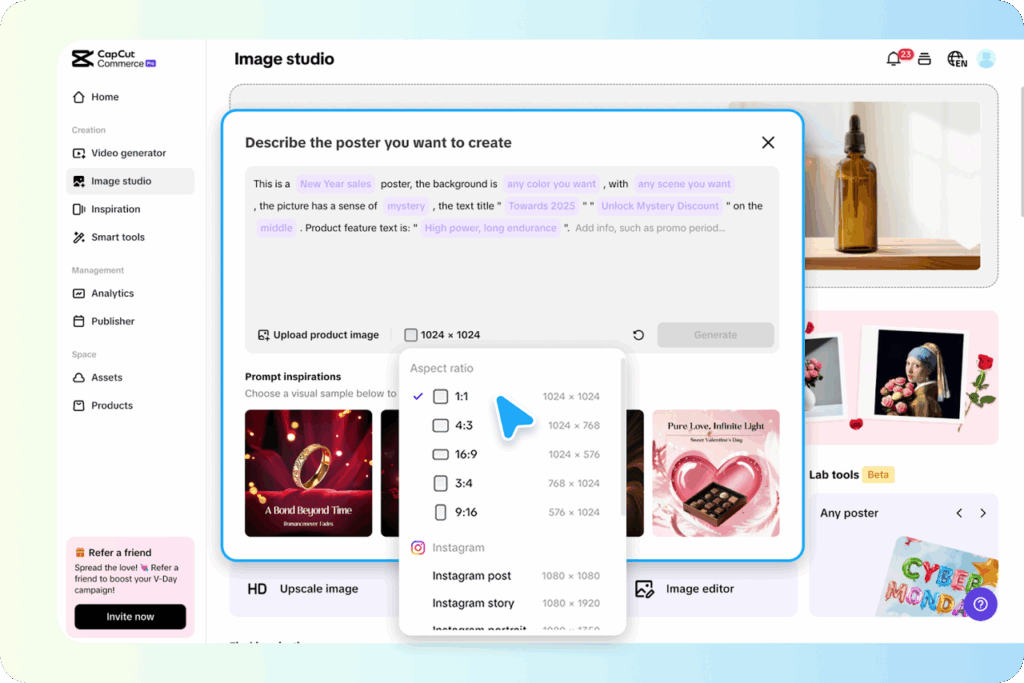
Step 1: Enter the Visual Workspace Log into your Pippit account and navigate to the Image Studio. From the tool menu, choose the Sales Poster option. Upload a branded image or select a ready-made template from Prompt Inspirations like “Brand Identity” or “Product Launch.” These templates carry pre-loaded messaging that reflects distinct tones.
/wp:paragraph
wp:image {“id”:241101,”sizeSlug”:”large”,”linkDestination”:”none”,”align”:”center”}

/wp:image
wp:paragraph
Step 2: Adjust Dimensions & Craft Prompt Once your image is set, adjust the layout using the Aspect Ratio menu—choose 1:1 for standard Instagram posts or 9:16 for Stories. Then enter a specific and clear prompt like “Highlight the eco-friendly features of our tote bag.” This guides the AI to match the caption tone to your values.
/wp:paragraph
wp:image {“id”:241102,”sizeSlug”:”large”,”linkDestination”:”none”,”align”:”center”}
/wp:image
wp:paragraph
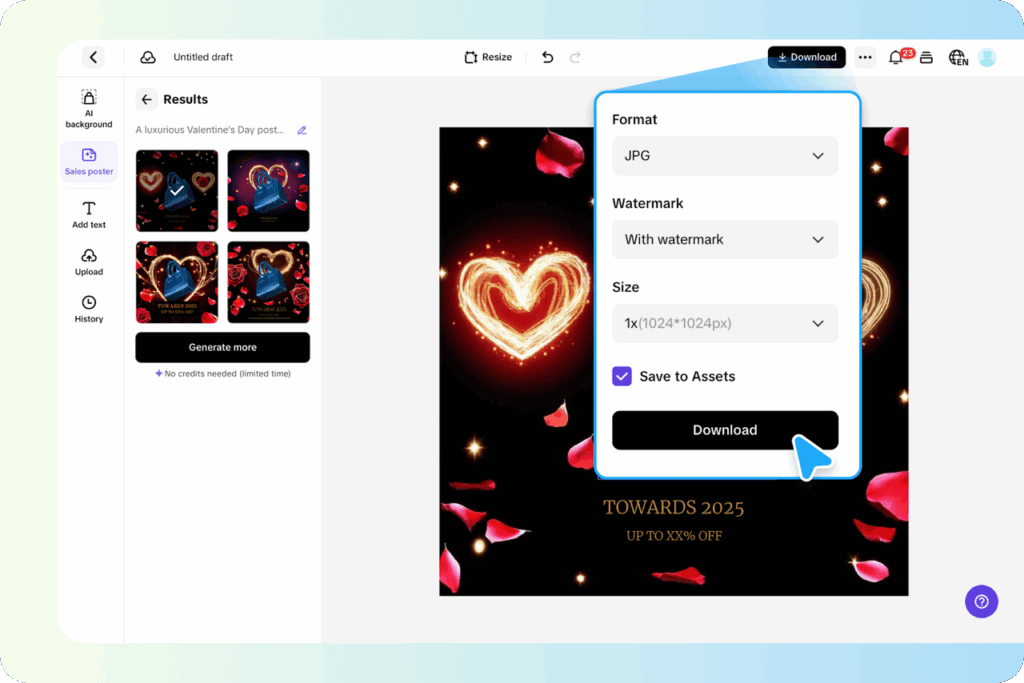
Step 3: Polish Your Messaging & Download Pippit’s AI generates several caption options in the Results tab. Review and select the one that best matches your voice. Customize font style, position text, and insert branded hashtags. Download your final version in the desired resolution. You can also save the design to Assets for future use.
/wp:paragraph
wp:image {“id”:241103,”sizeSlug”:”large”,”linkDestination”:”none”,”align”:”center”}
/wp:image
wp:heading
Optimizing Captions for Brand Consistency
/wp:heading
wp:paragraph
Using the “Save to Assets” feature lets you build a reliable content bank. This ensures every caption you create remains aligned with your voice. Keep versions for different post types like carousels, reels, and stories. Adjust tone slightly while maintaining the core personality.
/wp:paragraph
wp:paragraph
Experiment with variations, but never drift from your identity. Even when rephrasing a message, ensure your vocabulary, tone, and structure stay consistent. Pippit makes it easy to manage this with reusable templates and stored captions.
/wp:paragraph
wp:heading
Avoiding Brand Voice Pitfalls
/wp:heading
wp:paragraph
There are common missteps to watch for. Overusing humor or memes can dilute your credibility if they don’t fit your brand. Jumping between different tones—from serious to silly—in a single post confuses followers. Generic captions that lack personality won’t leave an impression.
/wp:paragraph
wp:paragraph
Always aim for balance. Trends are useful, but only when they support your message. Stay authentic. Avoid jargon that feels forced or out of place.
/wp:paragraph
wp:heading
Conclusion
/wp:heading
wp:paragraph
A strong, unified voice is a brand’s secret weapon on Instagram. It helps people understand who you are and why they should care. Pippit simplifies the entire process. From caption generation to design polish, it allows you to keep your messaging clear and on-brand across every post. By staying consistent and creative, your brand voice becomes not just recognizable—but unforgettable.
/wp:paragraph